Flink 작업을 위해서 Apache Flink 책인 "Stream Processing with Apache Flink: Fundamentals, Implementation, and Operation of Streaming Applications" 를 참고했으며 예제코드를 다운받아 작성했다.
For this Flink project, I referenced the Apache Flink book "Stream Processing with Apache Flink: Fundamentals, Implementation, and Operation of Streaming Applications" and downloaded the example code to work with.
사실상 코드는 책에서 제공 해 주는 코드를 실행하기 때문에, 주의 해 주어야 할 것은 Maven 설정을 잘 해주는 것과 Java 환경설정, 그리고 JAR 파일을 잘 말아주는 것 밖에는 할 것이 없었다.
Flink에 조금 더 익숙 해 진다면 직접 Flink Job을 만들어 보고싶은 생각이… -> 내가 아직 잘 사용 못하는 것 같다.. 일반 consumer application이랑 차이를 모르겠다..
Since we're essentially running code provided by the book, the only things to pay attention to are properly configuring Maven, setting up the Java environment, and correctly packaging the JAR file.
Once I become more familiar with Flink, I'd like to try creating my own Flink Job... -> I don't think I'm using it well yet.. I can't tell the difference from a regular consumer application..
Development Environment
- macOS
- Java 15
- Intellij
- Maven
Flink Job Code
소스코드 다운받기
Downloading the Source Code
소스코드 출처 - 링크
Source code origin - Link
git clone https://github.com/streaming-with-flink/examples-java
소스코드 Open하기 - Intellij
Opening the Source Code - Intellij
- Intellij → File → Open → [examples-java 다운경로]
- maven 파일 선택하기
- Intellij → File → Open → [examples-java download path]
- Select the maven file
소스코드
Source Code
-
java File
AverageSensorReadings.java/*
* Copyright 2015 Fabian Hueske / Vasia Kalavri
*
* Licensed under the Apache License, Version 2.0 (the "License");
* you may not use this file except in compliance with the License.
* You may obtain a copy of the License at
*
* http://www.apache.org/licenses/LICENSE-2.0
*
* Unless required by applicable law or agreed to in writing, software
* distributed under the License is distributed on an "AS IS" BASIS,
* WITHOUT WARRANTIES OR CONDITIONS OF ANY KIND, either express or implied.
* See the License for the specific language governing permissions and
* limitations under the License.
*/
package io.github.streamingwithflink.chapter1;
import io.github.streamingwithflink.util.SensorReading;
import io.github.streamingwithflink.util.SensorSource;
import io.github.streamingwithflink.util.SensorTimeAssigner;
import org.apache.flink.streaming.api.TimeCharacteristic;
import org.apache.flink.streaming.api.datastream.DataStream;
import org.apache.flink.streaming.api.environment.StreamExecutionEnvironment;
import org.apache.flink.streaming.api.functions.windowing.WindowFunction;
import org.apache.flink.streaming.api.windowing.time.Time;
import org.apache.flink.streaming.api.windowing.windows.TimeWindow;
import org.apache.flink.util.Collector;
public class AverageSensorReadings {
/**
* main() defines and executes the DataStream program.
*
* @param args program arguments
* @throws Exception
*/
public static void main(String[] args) throws Exception {
// set up the streaming execution environment
StreamExecutionEnvironment env = StreamExecutionEnvironment.getExecutionEnvironment();
// use event time for the application
env.setStreamTimeCharacteristic(TimeCharacteristic.EventTime);
// configure watermark interval
env.getConfig().setAutoWatermarkInterval(1000L);
// ingest sensor stream
DataStream<SensorReading> sensorData = env
// SensorSource generates random temperature readings
.addSource(new SensorSource())
// assign timestamps and watermarks which are required for event time
.assignTimestampsAndWatermarks(new SensorTimeAssigner());
DataStream<SensorReading> avgTemp = sensorData
// convert Fahrenheit to Celsius using and inlined map function
.map( r -> new SensorReading(r.id, r.timestamp, (r.temperature - 32) * (5.0 / 9.0)))
// organize stream by sensor
.keyBy(r -> r.id)
// group readings in 1 second windows
.timeWindow(Time.seconds(1))
// compute average temperature using a user-defined function
.apply(new TemperatureAverager());
// print result stream to standard out
avgTemp.print();
// execute application
env.execute("Compute average sensor temperature");
}
/**
* User-defined WindowFunction to compute the average temperature of SensorReadings
*/
public static class TemperatureAverager implements WindowFunction<SensorReading, SensorReading, String, TimeWindow> {
/**
* apply() is invoked once for each window.
*
* @param sensorId the key (sensorId) of the window
* @param window meta data for the window
* @param input an iterable over the collected sensor readings that were assigned to the window
* @param out a collector to emit results from the function
*/
@Override
public void apply(String sensorId, TimeWindow window, Iterable<SensorReading> input, Collector<SensorReading> out) {
// compute the average temperature
int cnt = 0;
double sum = 0.0;
for (SensorReading r : input) {
cnt++;
sum += r.temperature;
}
double avgTemp = sum / cnt;
// emit a SensorReading with the average temperature
out.collect(new SensorReading(sensorId, window.getEnd(), avgTemp));
}
}
} -
pom.xml
pom.xml<!--
Licensed to the Apache Software Foundation (ASF) under one
or more contributor license agreements. See the NOTICE file
distributed with this work for additional information
regarding copyright ownership. The ASF licenses this file
to you under the Apache License, Version 2.0 (the
"License"); you may not use this file except in compliance
with the License. You may obtain a copy of the License at
http://www.apache.org/licenses/LICENSE-2.0
Unless required by applicable law or agreed to in writing,
software distributed under the License is distributed on an
"AS IS" BASIS, WITHOUT WARRANTIES OR CONDITIONS OF ANY
KIND, either express or implied. See the License for the
specific language governing permissions and limitations
under the License.
-->
<project xmlns="http://maven.apache.org/POM/4.0.0"
xmlns:xsi="http://www.w3.org/2001/XMLSchema-instance"
xsi:schemaLocation="http://maven.apache.org/POM/4.0.0 http://maven.apache.org/xsd/maven-4.0.0.xsd">
<modelVersion>4.0.0</modelVersion>
<groupId>io.github.streamingwithflink</groupId>
<artifactId>examples-java</artifactId>
<version>1.0</version>
<packaging>jar</packaging>
<name>Java Examples for Stream Processing with Apache Flink</name>
<url>http://streaming-with-flink.github.io/examples</url>
<properties>
<project.build.sourceEncoding>UTF-8</project.build.sourceEncoding>
<flink.version>1.7.1</flink.version>
<java.version>1.8</java.version>
<scala.binary.version>2.12</scala.binary.version>
<maven.compiler.source>${java.version}</maven.compiler.source>
<maven.compiler.target>${java.version}</maven.compiler.target>
</properties>
<dependencies>
<!-- Apache Flink dependencies -->
<!-- These dependencies are provided, because they should not be packaged into the JAR file. -->
<dependency>
<groupId>org.apache.flink</groupId>
<artifactId>flink-java</artifactId>
<version>${flink.version}</version>
<scope>provided</scope>
</dependency>
<dependency>
<groupId>org.apache.flink</groupId>
<artifactId>flink-streaming-java_${scala.binary.version}</artifactId>
<version>${flink.version}</version>
<scope>provided</scope>
</dependency>
<!-- runtime-web dependency is need to start web UI from IDE -->
<dependency>
<groupId>org.apache.flink</groupId>
<artifactId>flink-runtime-web_${scala.binary.version}</artifactId>
<version>${flink.version}</version>
<scope>provided</scope>
</dependency>
<!-- queryable-state dependencies are needed for respective examples -->
<dependency>
<groupId>org.apache.flink</groupId>
<artifactId>flink-queryable-state-runtime_${scala.binary.version}</artifactId>
<version>${flink.version}</version>
</dependency>
<dependency>
<groupId>org.apache.flink</groupId>
<artifactId>flink-queryable-state-client-java_${scala.binary.version}</artifactId>
<version>${flink.version}</version>
</dependency>
<!--
Derby is used for a sink connector example.
Example only works in local mode, i.e, it is not possible to submit it to a running cluster.
The dependency is set to provided to reduce the size of the JAR file.
-->
<dependency>
<groupId>org.apache.derby</groupId>
<artifactId>derby</artifactId>
<version>10.13.1.1</version>
<scope>provided</scope>
</dependency>
<!-- Logging -->
<dependency>
<groupId>org.slf4j</groupId>
<artifactId>slf4j-log4j12</artifactId>
<version>1.7.25</version>
<scope>runtime</scope>
</dependency>
<dependency>
<groupId>log4j</groupId>
<artifactId>log4j</artifactId>
<version>1.2.17</version>
<scope>runtime</scope>
</dependency>
</dependencies>
<build>
<plugins>
<!-- Java Compiler -->
<plugin>
<groupId>org.apache.maven.plugins</groupId>
<artifactId>maven-compiler-plugin</artifactId>
<version>3.1</version>
<configuration>
<source>${java.version}</source>
<target>${java.version}</target>
</configuration>
</plugin>
<!-- We use the maven-shade plugin to create a fat jar that contains all necessary dependencies. -->
<!-- Change the value of <mainClass>...</mainClass> if your program entry point changes. -->
<plugin>
<groupId>org.apache.maven.plugins</groupId>
<artifactId>maven-shade-plugin</artifactId>
<version>3.0.0</version>
<executions>
<!-- Run shade goal on package phase -->
<execution>
<phase>package</phase>
<goals>
<goal>shade</goal>
</goals>
<configuration>
<artifactSet>
<excludes>
<exclude>org.apache.flink:force-shading</exclude>
<exlude>org.apache.flink:flink-shaded-netty</exlude>
<exlude>org.apache.flink:flink-shaded-guava</exlude>
<exclude>com.google.code.findbugs:jsr305</exclude>
<exclude>org.slf4j:*</exclude>
<exclude>log4j:*</exclude>
</excludes>
</artifactSet>
<filters>
<filter>
<!-- Do not copy the signatures in the META-INF folder.
Otherwise, this might cause SecurityExceptions when using the JAR. -->
<artifact>*:*</artifact>
<excludes>
<exclude>META-INF/*.SF</exclude>
<exclude>META-INF/*.DSA</exclude>
<exclude>META-INF/*.RSA</exclude>
</excludes>
</filter>
</filters>
<transformers>
<transformer implementation="org.apache.maven.plugins.shade.resource.ManifestResourceTransformer">
<mainClass>io.github.streamingwithflink.StreamingJob</mainClass>
</transformer>
</transformers>
</configuration>
</execution>
</executions>
</plugin>
</plugins>
<pluginManagement>
<plugins>
<!-- This improves the out-of-the-box experience in Eclipse by resolving some warnings. -->
<plugin>
<groupId>org.eclipse.m2e</groupId>
<artifactId>lifecycle-mapping</artifactId>
<version>1.0.0</version>
<configuration>
<lifecycleMappingMetadata>
<pluginExecutions>
<pluginExecution>
<pluginExecutionFilter>
<groupId>org.apache.maven.plugins</groupId>
<artifactId>maven-shade-plugin</artifactId>
<versionRange>[3.0.0,)</versionRange>
<goals>
<goal>shade</goal>
</goals>
</pluginExecutionFilter>
<action>
<ignore/>
</action>
</pluginExecution>
<pluginExecution>
<pluginExecutionFilter>
<groupId>org.apache.maven.plugins</groupId>
<artifactId>maven-compiler-plugin</artifactId>
<versionRange>[3.1,)</versionRange>
<goals>
<goal>testCompile</goal>
<goal>compile</goal>
</goals>
</pluginExecutionFilter>
<action>
<ignore/>
</action>
</pluginExecution>
</pluginExecutions>
</lifecycleMappingMetadata>
</configuration>
</plugin>
</plugins>
</pluginManagement>
</build>
<!-- This profile helps to make things run out of the box in IntelliJ -->
<!-- Its adds Flink's core classes to the runtime class path. -->
<!-- Otherwise they are missing in IntelliJ, because the dependency is 'provided' -->
<profiles>
<profile>
<id>add-dependencies-for-IDEA</id>
<activation>
<property>
<name>idea.version</name>
</property>
</activation>
<dependencies>
<dependency>
<groupId>org.apache.flink</groupId>
<artifactId>flink-java</artifactId>
<version>${flink.version}</version>
<scope>compile</scope>
</dependency>
<dependency>
<groupId>org.apache.flink</groupId>
<artifactId>flink-streaming-java_${scala.binary.version}</artifactId>
<version>${flink.version}</version>
<scope>compile</scope>
</dependency>
<dependency>
<groupId>org.apache.flink</groupId>
<artifactId>flink-runtime-web_${scala.binary.version}</artifactId>
<version>${flink.version}</version>
<scope>compile</scope>
</dependency>
<dependency>
<groupId>org.apache.derby</groupId>
<artifactId>derby</artifactId>
<version>10.13.1.1</version>
<scope>compile</scope>
</dependency>
</dependencies>
</profile>
</profiles>
</project>
JAR 파일 만들기
Creating the JAR File
프로젝트 우클릭 → 모듈설정 → 아티팩트 설정 → 추가 → JAR file → 종속성 포함 모듈 설정
위의 명령대로 실행하면 아래의 화면이 나온다.
Right-click project → Module Settings → Artifact Settings → Add → JAR file → Module with Dependencies Settings
Following the commands above will display the screen below.
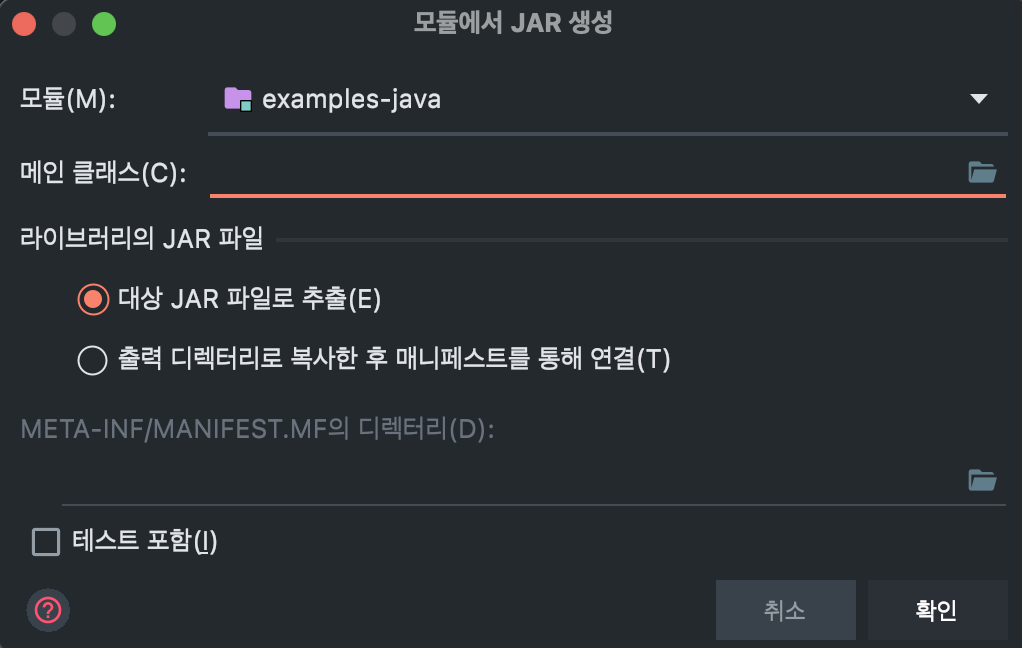
메인 클래스 오른쪽에 폴더를 누르면 우리가 실행 할 Main 파일이 자동으로 등록 되어 있디.
설정이 완료되면 '확인'을 눌러주고 팝업창을 닫아주자.
이제 JAR 파일을 말아주어야 한다. 설정한 아티팩트대로 JAR가 빌드 된다. 아까 우리가 아티팩트를 설정 했기 때문에 빌드 메뉴의 아티팩트 빌드가 활성화 되어있을 것이다.
빌드 → 아티팩트 빌드
빌드가 완료된다면 우리가 지정한 경로에 JAR 파일이 생성된다 (특별한 설정을 하지 않았기 때문에 out/artifacts/examples_jar 폴더 아래에 생성 된다.
Click the folder icon to the right of the Main Class and the Main file we want to run will be automatically registered.
Once the settings are complete, click 'OK' and close the popup window.
Now we need to package the JAR file. The JAR will be built according to the artifact settings. Since we configured the artifact earlier, the Build Artifact option should be enabled in the Build menu.
Build → Build Artifacts
Once the build is complete, the JAR file will be created at the path we specified (since we didn't configure special settings, it will be created under the out/artifacts/examples_jar folder).
Flink Job 등록하기
Registering a Flink Job
이제 만들어 준 Flink Job을 Docker로 설정 한 Flink 서버에 넣어 주어야 한다.
왼쪽 메뉴에 가장 아래에 있는 "Submit new Job"을 눌러주자
Now we need to upload the Flink Job we created to the Flink server configured with Docker.
Click on "Submit new Job" at the bottom of the left menu.
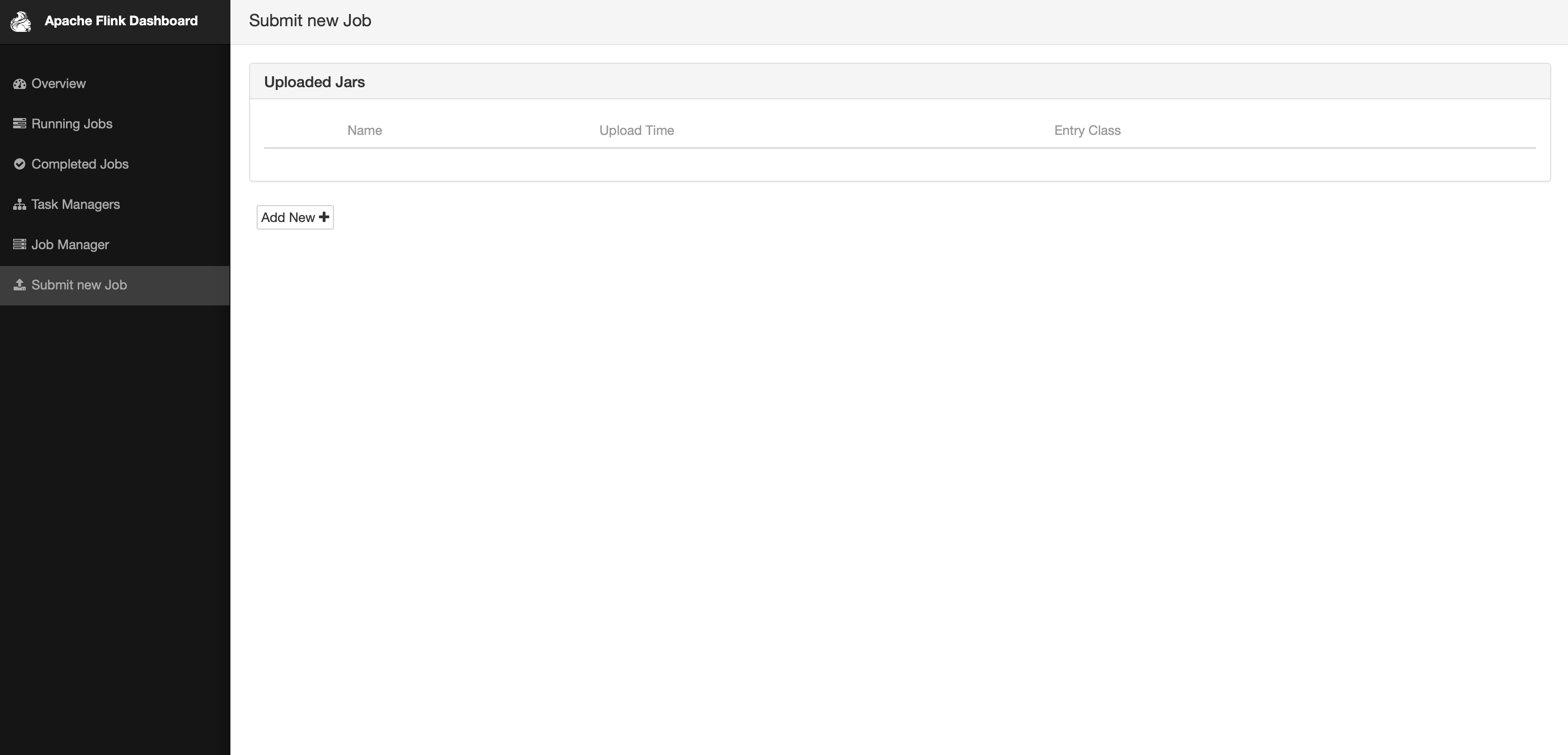
Add New 를 누르면, 우리가 만든 JAR 파일을 하나의 Job으로 등록 할 수 있다.
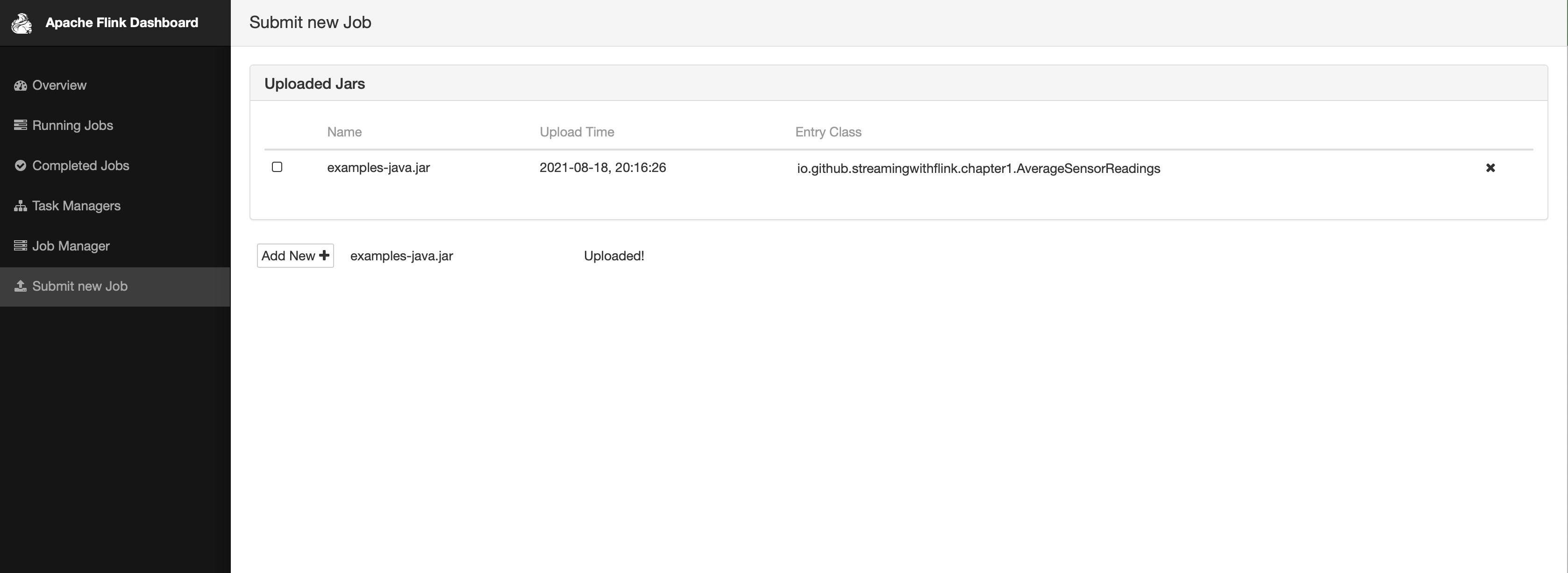
Add New를 누르고, JAR 파일을 선택해서 Upload하면 아래의 화면처럼 JOB이 등록된다.
By clicking Add New, we can register the JAR file we created as a Job.
Click Add New, select the JAR file and upload it, and the JOB will be registered as shown in the screen below.
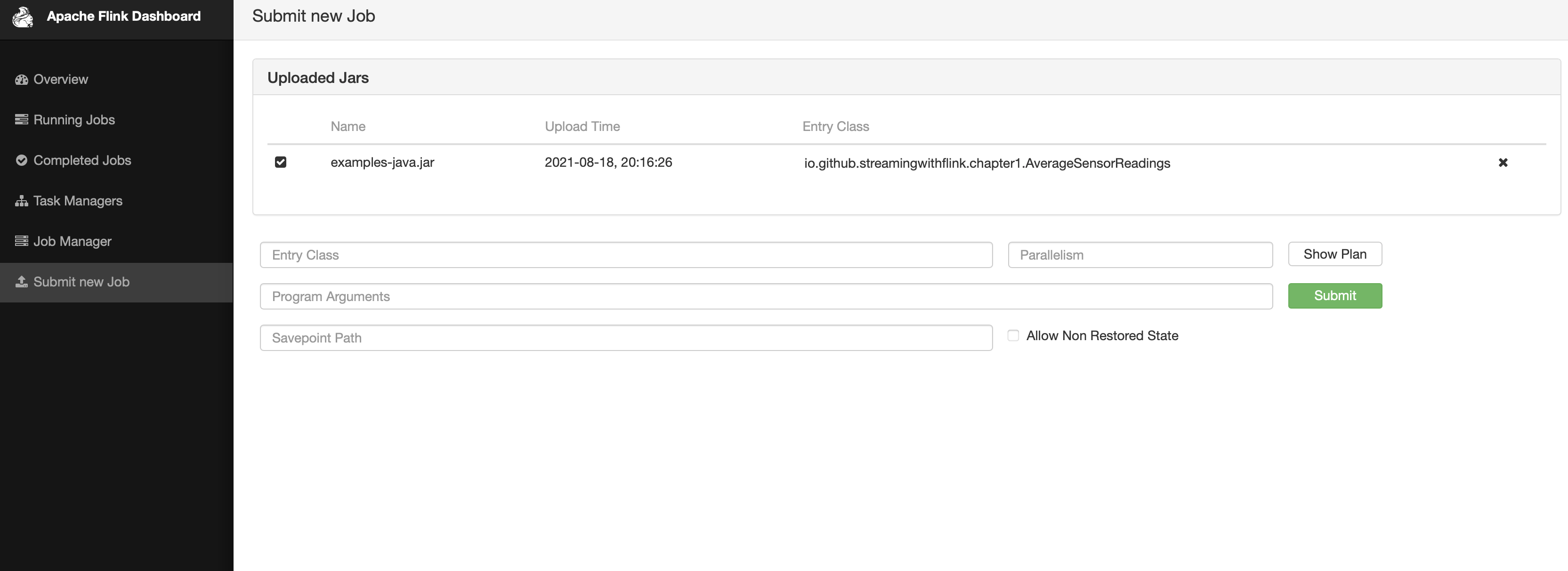
이제 실행 할 수 있도록 해당하는 job을 눌러주고 실행을 위해 submit을 눌러주세요
Now click on the corresponding job to run it and click submit to execute.
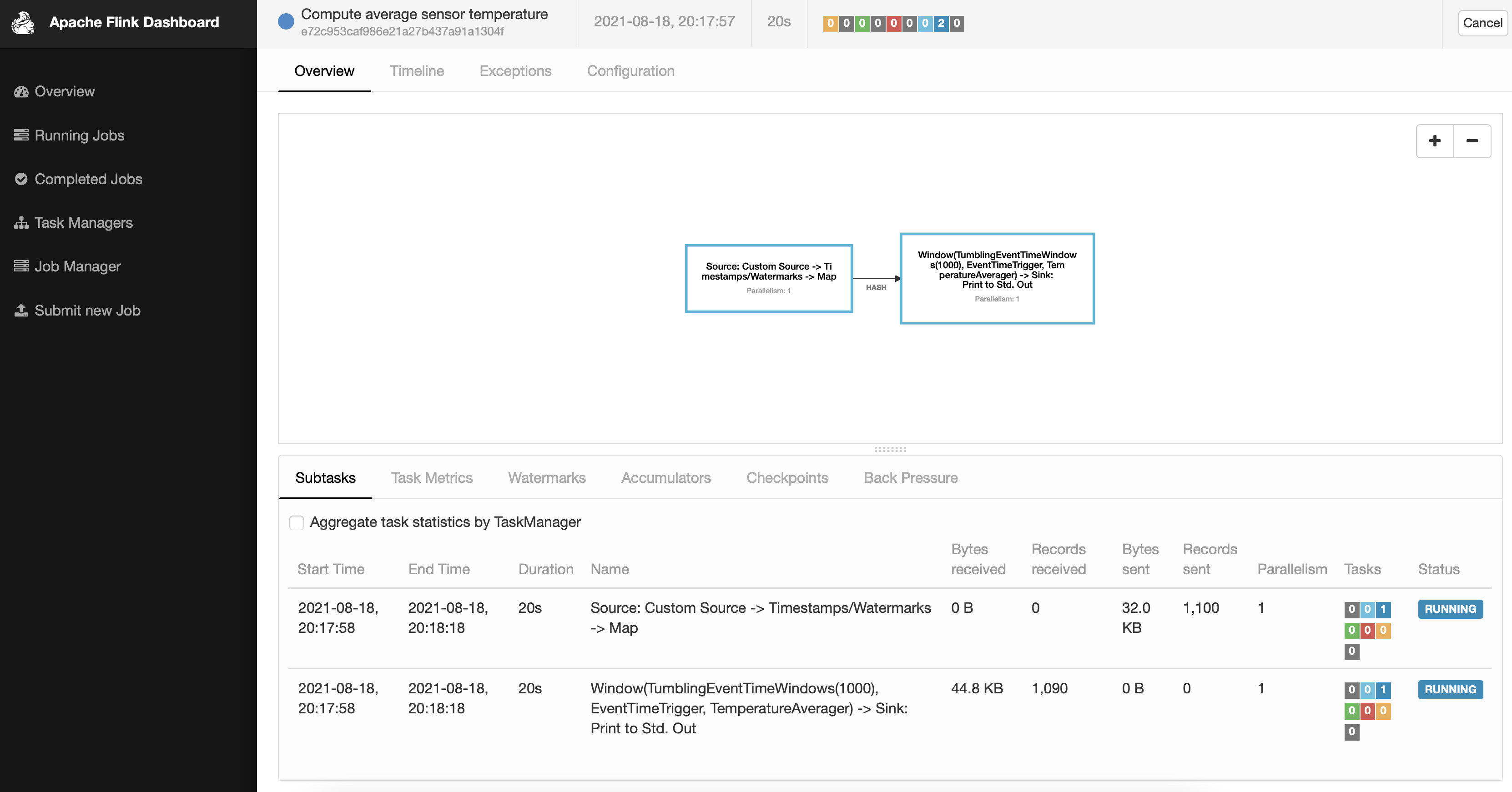
Submit이 완료되면 아래의 화면처럼 태스크가 실행 되는 것을 확인 할 수 있다.
Once the submit is complete, you can confirm that the task is running as shown in the screen below.
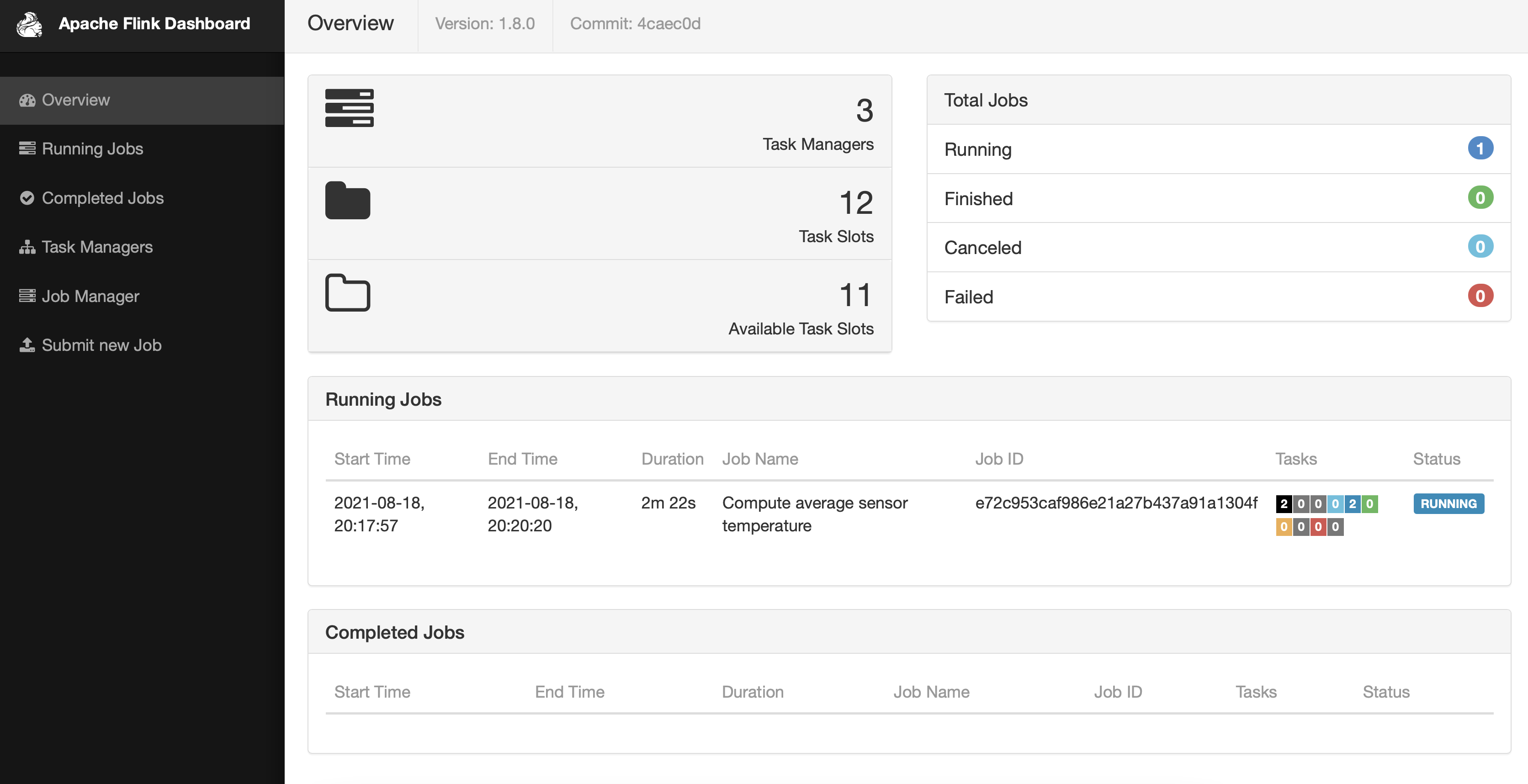
OverView 메뉴에서도 우리가 실행 한 작업들이 잘 보인다
The tasks we executed are also visible in the Overview menu.
아직 완료하지 못한 것
Things Not Yet Completed
docker가 아닌 로컬에서 Flink를 실행하고 job을 올리면 잘 보이는 Flink log가 Docker 상에서는 보이지 않는다. 아직 이유를 모른다.
When running Flink locally (not in Docker) and uploading a job, the Flink logs are visible, but they don't appear when running on Docker. I don't know the reason yet.
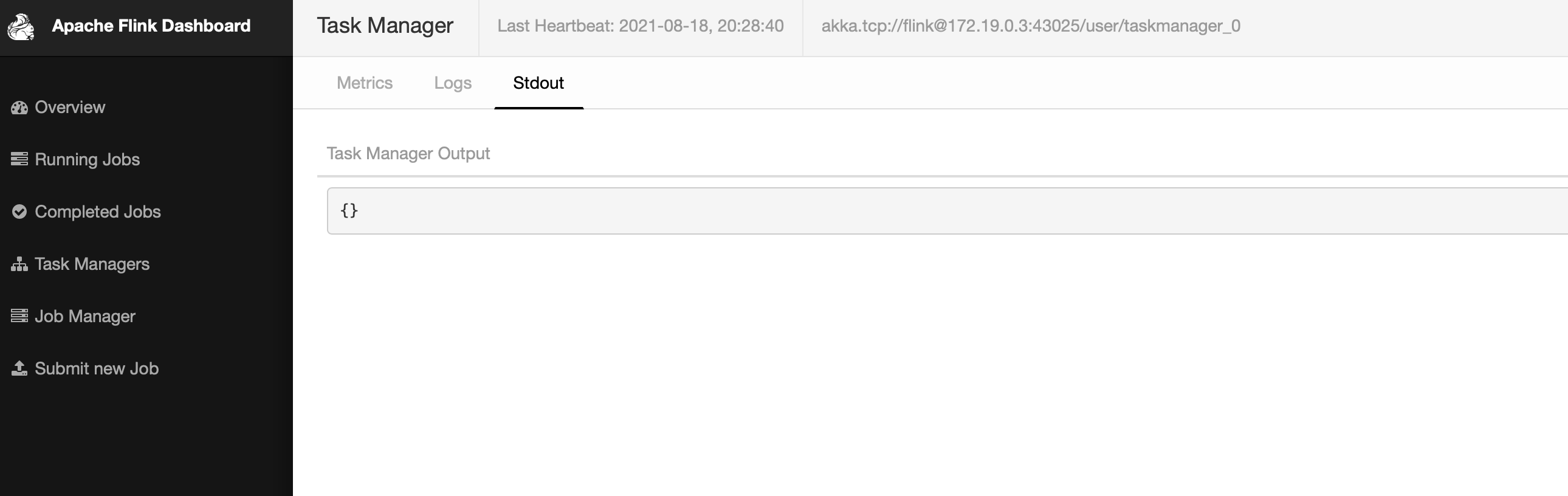
"Internal server error.","<Exception on server side:org.apache.flink.util.FlinkException: The file STDOUT is not available on the TaskExecutor…… "
요런 에러가 뜨는데 해결 해야 할 Task로 남겨두고 공부 해 봐야겠다..
This error appears, so I'll leave it as a task to solve and study later..