파이썬으로 개발하다보면 여러가지 가상환경 매니징 패키지를 마주하게 된다. 이번에는 패키지의 버전까지 관리 해 주는 새로운 친구인 poetry를 도입 해 보려고 한다.
When developing with Python, you encounter various virtual environment management packages. This time, I'm going to introduce Poetry, a new tool that also manages package versions.
우선 사용하기 위해서는 Poetry를 설치하자
Let's Use Poetry
First, let's install Poetry to get started.
설치
poetry는 파이썬 패키지로도 설치 할 수 있고, 맥의 설치패키지인 brew로도 설치 할 수 있다.
Installation
Poetry can be installed as a Python package or through Homebrew on Mac.
설치 방법 - brew
Installation Method - brew
brew install poetry
설치 방법 - pip
Installation Method - pip
pip install poetry
패키지 Init
poetry를 사용해서 파이썬을 개발 하려면 init 이라는 명령어로 해당 파일에 선언 해 주어야 한다.
Package Init
To develop Python using Poetry, you need to declare it in the directory using the init command.
poetry init
그럼, init에 필요한 여러가지들을 물어보는데 해당하는 파이썬 프로젝트의 특성에 맞게 적어주면 된다
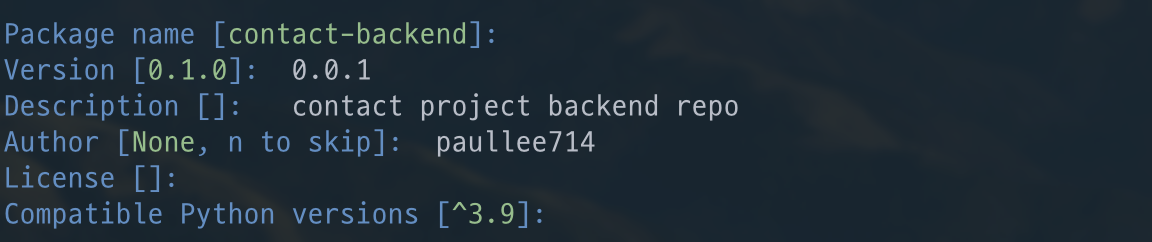 여러가지를 물어보면서 파이썬 개발환경 세팅을 준비합니다
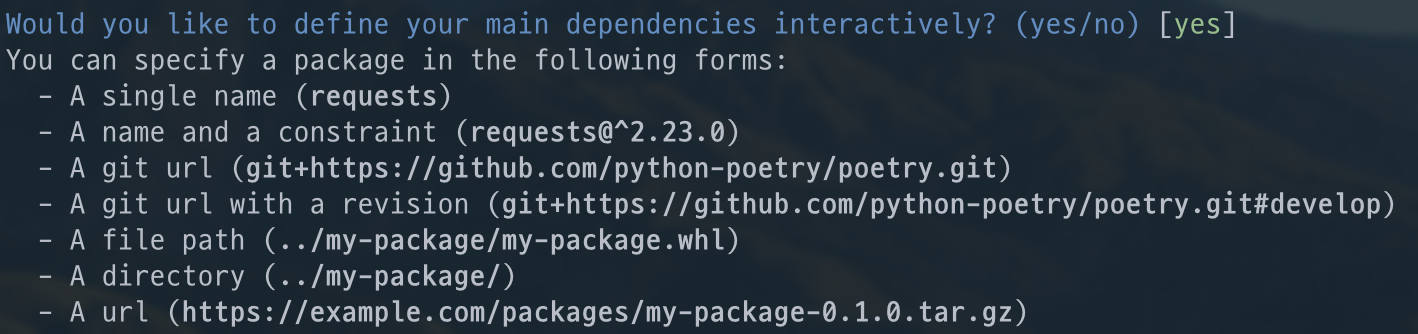 이렇게 적어주기는 했지만, 맨 첫번째 화면부터 마지막까지 그냥 엔터만 눌러주면 파이썬 개발 프로젝트 세팅이 마무리가 됩니다. 마무리가 되면 아래의 화면처럼 프로젝트 환경 요약본이 나오게 됩니다.
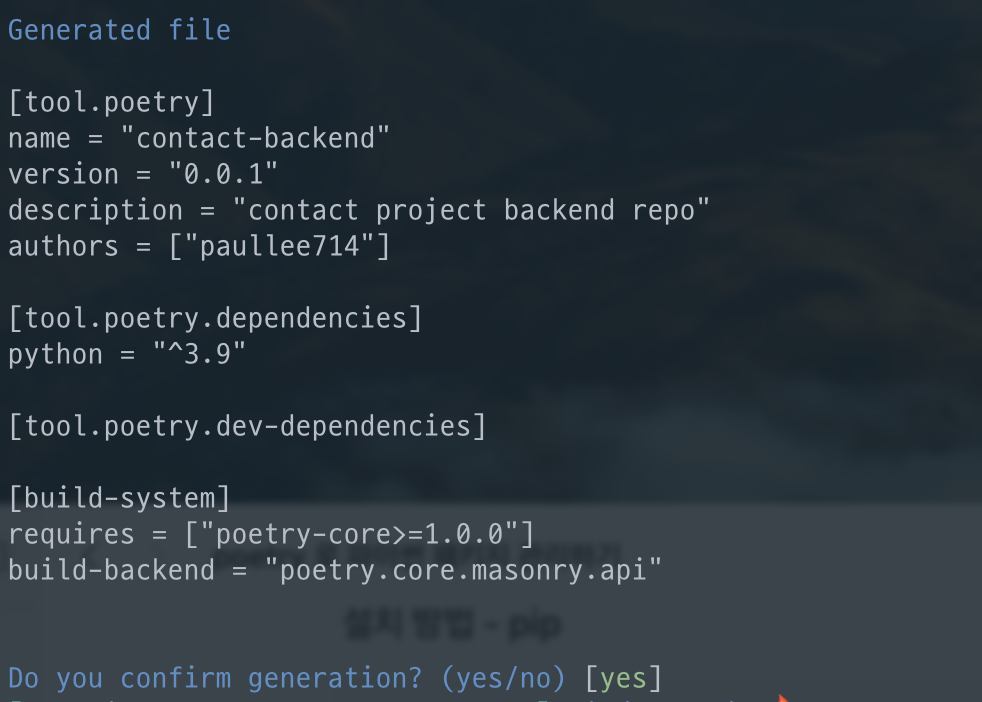 그럼 pyproject.toml 파일이 생성되면서 환경설정이 종료가 됩니다
Then, it will ask various questions needed for init, and you can fill them in according to your Python project's characteristics.
It asks various questions while preparing the Python development environment setup.
Although I filled in these details, you can simply press Enter from the first screen to the last to complete the Python development project setup. When finished, you'll see a project environment summary like the screen below.
Then the pyproject.toml file is created and the configuration is complete.
poetry 사용법 - shell, add
poetry shell
poetry로 패키지 설정을 해 주었으니까 이제 사용 해 보겠습니다
가상환경을 실행시키는 shell 명령어를 사용 하겠습니다
Poetry Usage - shell, add
poetry shell
Now that we've configured the package with Poetry, let's use it.
We'll use the shell command to activate the virtual environment.
poetry shell
그럼 패키지에 해당하는 파이썬 가상환경 생성 및 실행이 됩니다
This will create and activate the Python virtual environment for the package.
poetry add
가상환경을 실행시키고 가상환경에 패키지를 설치 하려면 add 명령어를 실행 해야 합니다
poetry가 좋은 이유 중 하나는, 굳이 가상환경을 실행(shell)을 하지 않아도 add 명령어를 사용하면 알아서 설치 해 준다는 겁니다….!!!!!!
파이썬에서 자주 사용하는 Django, Flask, requests, aiohttp를 설치 해 보겠습니다
poetry add
To install packages in the virtual environment, you need to run the add command.
One of the great things about Poetry is that you don't even need to activate the virtual environment (shell) - when you use the add command, it automatically installs the packages for you!
Let's install some commonly used Python packages: Django, Flask, requests, and aiohttp.
poetry add Django Flask requests aiohttp
원래 pip이면 그냥 해당하는 패키지의 최신 버전을 설치 해 주겠지만 우리친구 강한친구 poetry는 그러지 않습니다
 받아야 할 패키지 파일들을 검색하고 해당하는 패키지들의 Dependency에 맞게 설치를 해 줍니다
Normally, pip would just install the latest version of the packages, but our powerful friend Poetry doesn't work that way.
It searches for the package files to be downloaded and installs them according to their dependency requirements.
pyproject.toml
poetry로 패키지들을 설치 한 후, 어떤 패키지가 설치 되었는지 자동으로 업데이트가 됩니다
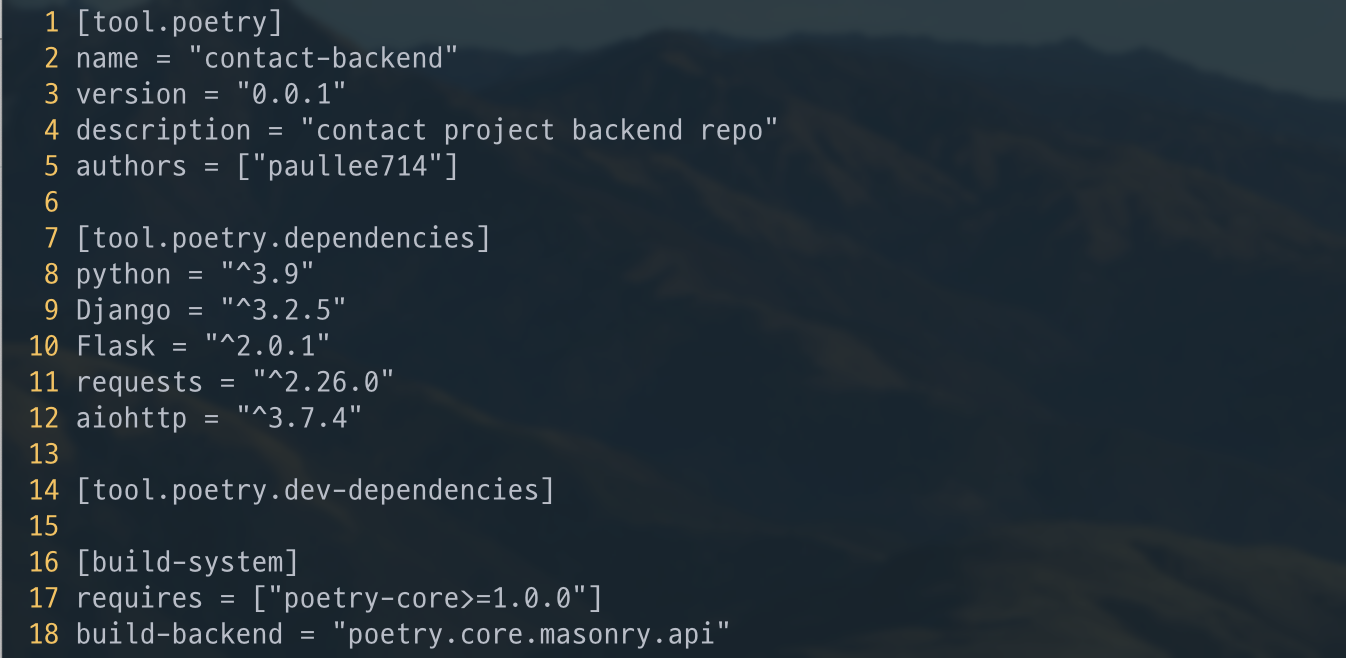
pyproject.toml
After installing packages with Poetry, the file is automatically updated with information about which packages have been installed.